Fill out the WH-347 from your payroll file
PrevailReady produces the official Davis-Bacon weekly certified payroll form, Rev. January 2025, from the payroll report and timesheet you already export. Every journeyworker line is checked against your wage determination before the form is built.
A real WH-347, filled from a payroll file
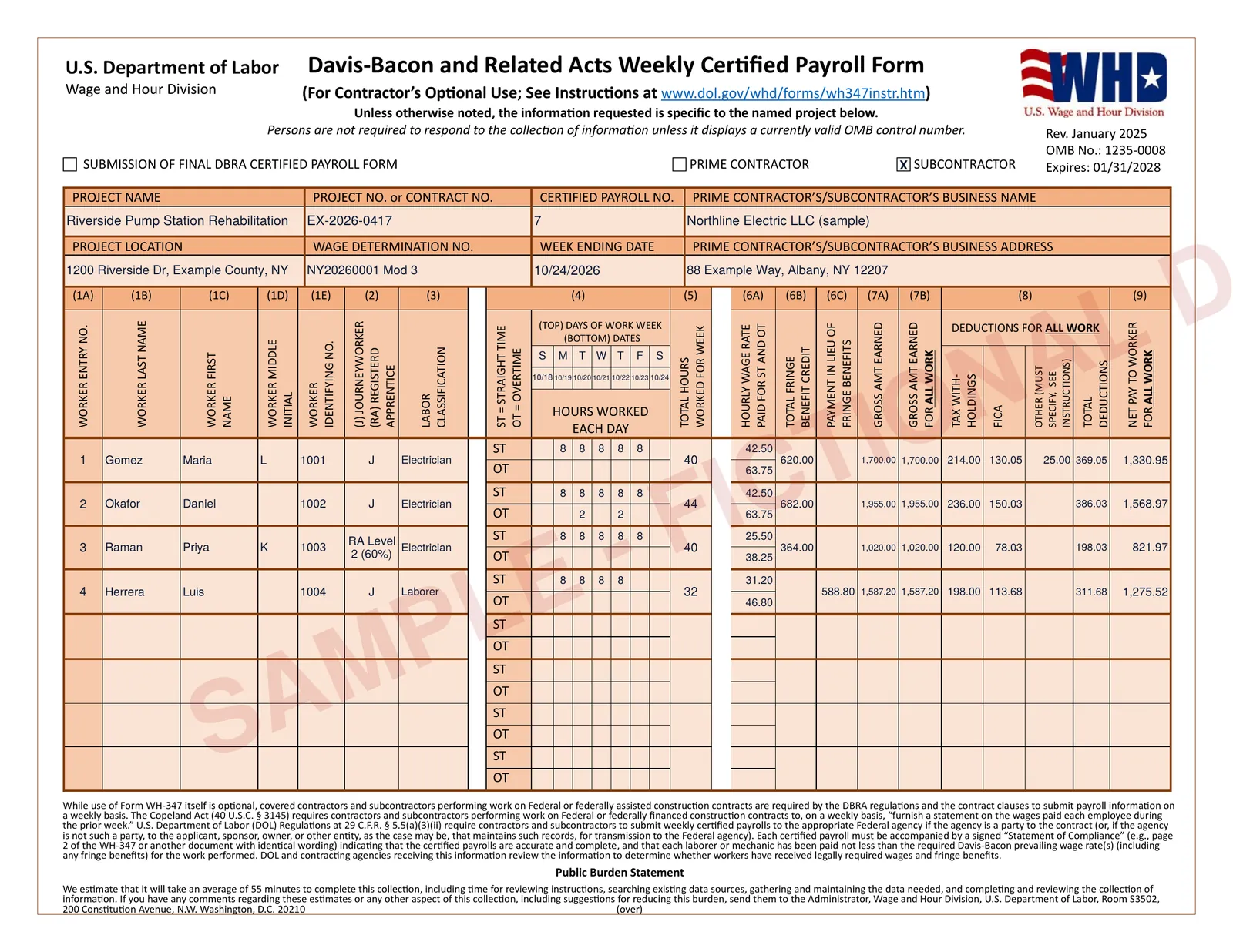
This is page 1 of the sample PDF, generated by PrevailReady from this sample payroll CSV. The company, workers and project are fictional; the form is the Department of Labor's own January 2025 PDF.
What PrevailReady fills, field by field
Project details come from the project settings you enter once. Hours come from your timesheet for this project's job; pay, taxes and deductions come from your payroll report for the whole week.
Page 1
- Header
- Project name and location, project or contract number, wage determination number, business name and address, prime contractor or subcontractor, and the final payroll box when you mark the last week.
- Payroll no.
- Numbered from 1 for each project and suggested automatically for the next week.
- Week ending
- The last day of the workweek. Days of the week and dates fill column 4 from it.
- 1A to 1E
- Worker entry number, last, first and middle name, and the identifying number from your file. Nine-digit Social Security numbers are refused, whatever the spacing or punctuation.
- 2 and 3
- J for journeyworker or RA for registered apprentice with the level of progression, and the labor classification actually worked. A worker in two classifications gets one line for each, under the same entry number.
- 4 and 5
- Straight-time and overtime hours for each day, and the week's total.
- 6A to 6C
- Hourly rates paid for straight time and overtime, the total fringe benefit credit (hours times the hourly credit claimed), and cash paid in lieu of fringe benefits.
- 7A to 9
- Gross earned on this project and for all work, tax withholdings, FICA, other deductions, total deductions and net pay.
Page 2
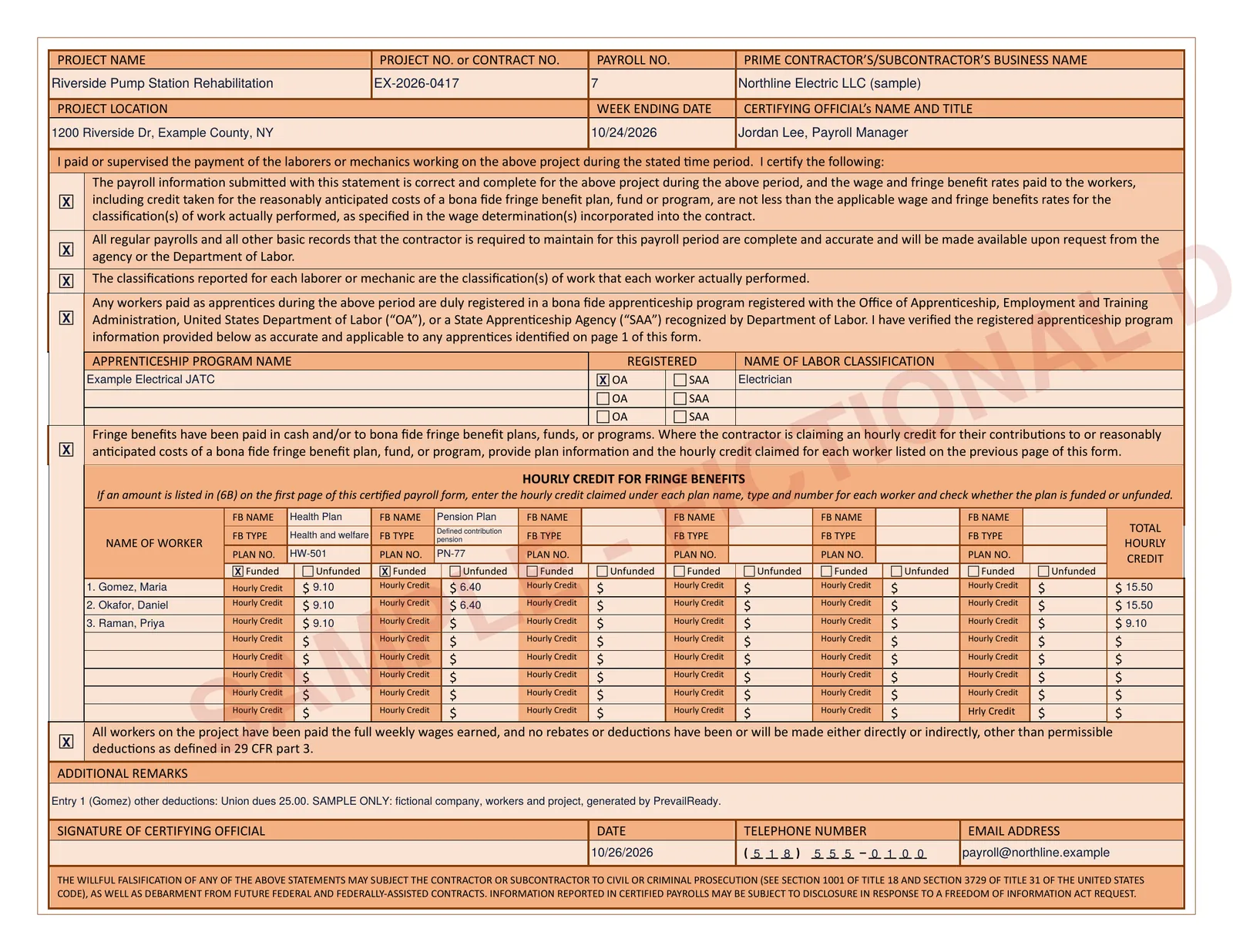
- Statement
- The statements of compliance, which you confirm in the app before download (box 4 when apprentices worked, box 5 when you claim fringe plan credits or pay cash in lieu of fringe benefits), and the certifying official's name and title.
- Apprentices
- Registered apprenticeship program name, OA or SAA registration and classification for any apprentices on the payroll.
- Fringe plans
- Plan name, type and number, funded or unfunded, and each worker's hourly credit per plan with the total. More than six plans continue on an addendum page.
- Remarks
- Any remarks you add. A single other deduction is described here; when a worker has more than one, they are itemized on an addendum page, as DOL's instructions ask.
- Signature
- Telephone and email come from project settings, and the date is printed if you enter it. The signature line is left for you to sign by hand or with a legally valid electronic signature.
Compared with filling it by hand
The Department of Labor's PDF has no fillable fields, and its online version is filled one worker at a time.
WH-347 questions
Which version of the WH-347 does PrevailReady use?
The current form, Rev. January 2025 (OMB No. 1235-0008, expiring 01/31/2028). The approval for the previous version expired on September 30, 2026.
Can I use the WH-347 for a New York State project?
New York State Article 8 prevailing wage projects report through the NYSDOL Certified Payroll portal (New York City public work uses the City's own system). PrevailReady creates the NYSDOL bulk-upload XML from the same payroll upload, so one import covers both when a project needs both.
What if a worker worked in more than one classification?
Each classification gets its own line on page 1 under the same worker entry number, as the instructions require, with the hours and rates for that classification.
How many workers fit on one form?
Page 1 holds eight worker lines. Larger payrolls continue on additional numbered pages, each with its own page 2, in one PDF.
Does PrevailReady sign or submit the WH-347?
No. You sign the statement of compliance yourself and submit the form to the contracting agency or prime contractor. A scanned signature is not a valid electronic signature, according to the Department of Labor.
Create this week's WH-347 from your payroll
Set up the project, upload the payroll export and review the checks for free. Download for $9, or with a monthly plan.